Tag Archives: Google rankings

DO VIDEOS SLOW DOWN A WEBSITE?


This is a question that I’m often asked. It has come from both clients AND website designers – who should know better, by the way. Video is probably the best tool for marketing your business and getting found by potential customers. Videos enhance your expertise. Videos enhance trust in your business. And when it comes to showing off your product, or showing what your customers think of your product, there is no better way to communicate.

Many video files can be extremely large. Even 30 second videos can be close to a gigabyte in size, which could indeed make your website load very slowly. The size of the video player can also be a factor. However, there are some editing programs which will reduce the size of a video file while keeping the quality intact. These tools can play your videos while barely making a tic in your website speed.

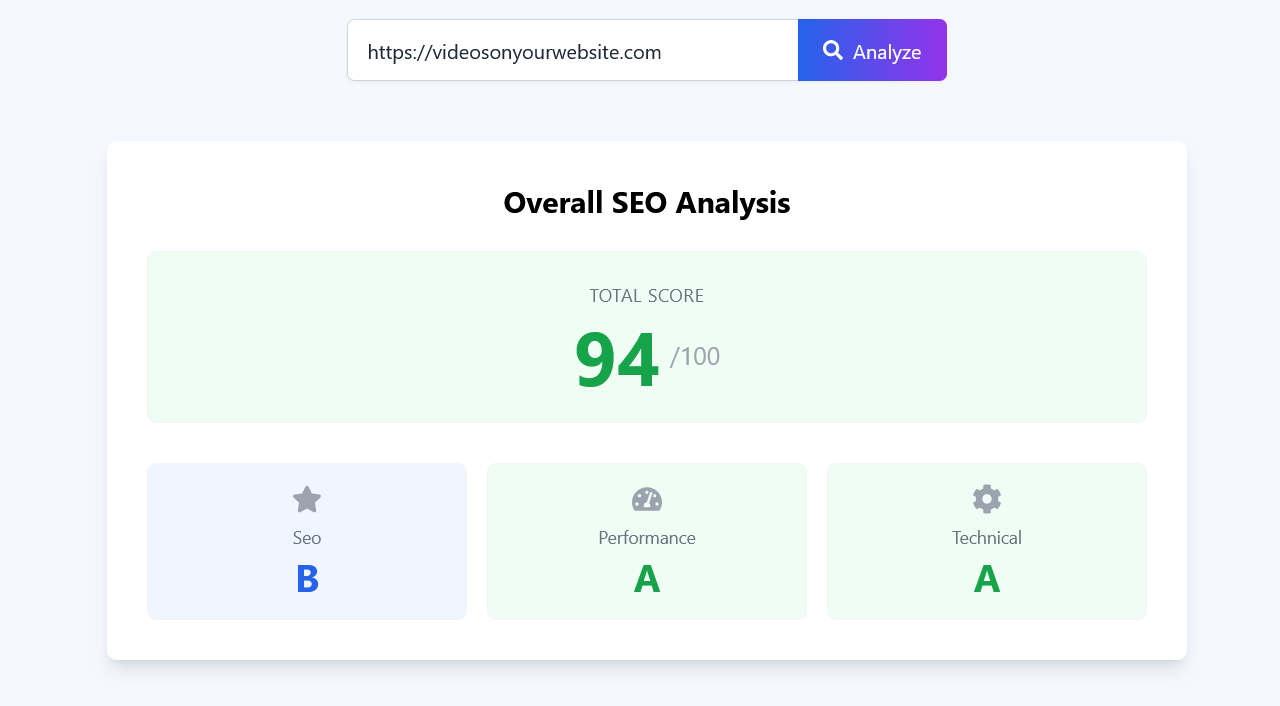
The graphic above shows an analysis of my website. I have a video or multiple videos on almost every page. Apart from the fact that the SEO checker did not like a couple of my page titles, the score is excellent with no speed issues. Optimizing my content makes the difference.

Don’t be afraid of adding videos to your website or blog if speed is an issue. You may just be surprised at how fast customers start responding to you instead.
–that’s a wrap

Ron Harper is the founder of Videos On Your Website, a Cincinnati digital marketing firm specializing in video web content for businesses. Read more at Videos ON Your Website.

CAN I PUT SOMEONE ELSE’S YouTube VIDEO ON MY WEBSITE?


Well, the answer is a qualified Yes. If you embed a video from a platform like YouTube, you are not risking copyright violation. However, if the owner at any point deletes the video, you may be left with a blank spot on your site.
Copyright violations occur when you make a copy of someone else’s video and post it on a website or blog. Stick to using the “share code” for best results. The “share code” can usually be found right under the video player. It will be a short string of code that you can insert into a blog or a website if you have that ability without going “behind the scenes”.

I once had a client who wanted to use a video from a trade association that he belonged to. It would have been fine, however , the Call To Action was a direct appeal from that trade association. On his service website, that may have been confusing to his visitors. Instead, I was able to creatively edit the video so it included his call to action for potential customers.

At any rate, video can be one of the most important marketing tools any business can use.
–That’s a wrap.
Ron Harper is the founder of Videos On Your Website, a Cincinnati digital marketing firm specializing in video web content for businesses. Read more at Videos ON Your Website.

HOW USING VIDEOS ON YOUR WEBSITE HELPS YOUR BUSINESS

videosonyourwebsite.com
www.videosonyourwebsite.com

More than 91% of businesses use video as a marketing tool. Video is the most cost effective and fastest way to get your product in front of people. Videos are powerful for telling the stories about your business. People are also 52% more likely to share a video than an article. Search engines love content-rich pages, and videos are a big part of that.

Explainers or promos on the homepage, and also on About Us, or product and service pages add to the user experience. Career sections or support pages need videos, too.

How many videos should you have on your website? I’ve found that a minimum of three videos do the most for establishing credibility and authority. Of course, you can have more, but the rule of thumb is: wherever you place a video on your page, make sure you have some kind of text around it. It’s also helpful to add a duration. Telling the visitor how much time he will be investing is an engaging tool that actually helps your videos get more clicks.

Making sure that you have relevant, engaging content will keep visitors on your site longer. Clean presentation is also key. Oddly enough, the most important quality in video is – audio. If the sound is bad, or hard to hear, visitors won’t watch more than a few seconds. The second most important quality is lighting. Well-lit subjects are more watchable. And finally, the third most important quality is stabilization. Shaky camera moves do nothing to tell your story and keep viewers engaged.

Video cuts through the noise and captivates customers and prospects alike. It’s time to get that competitive edge and harness the power of video on your website.

–that’s a wrap.
Should You Embed Videos From Other Companies?

Embedding Videos
Problems with embedding videos from other companies

If you can’t produce your own videos for your website, why not just find some others and embed them? Simple, right? Well, not exactly.

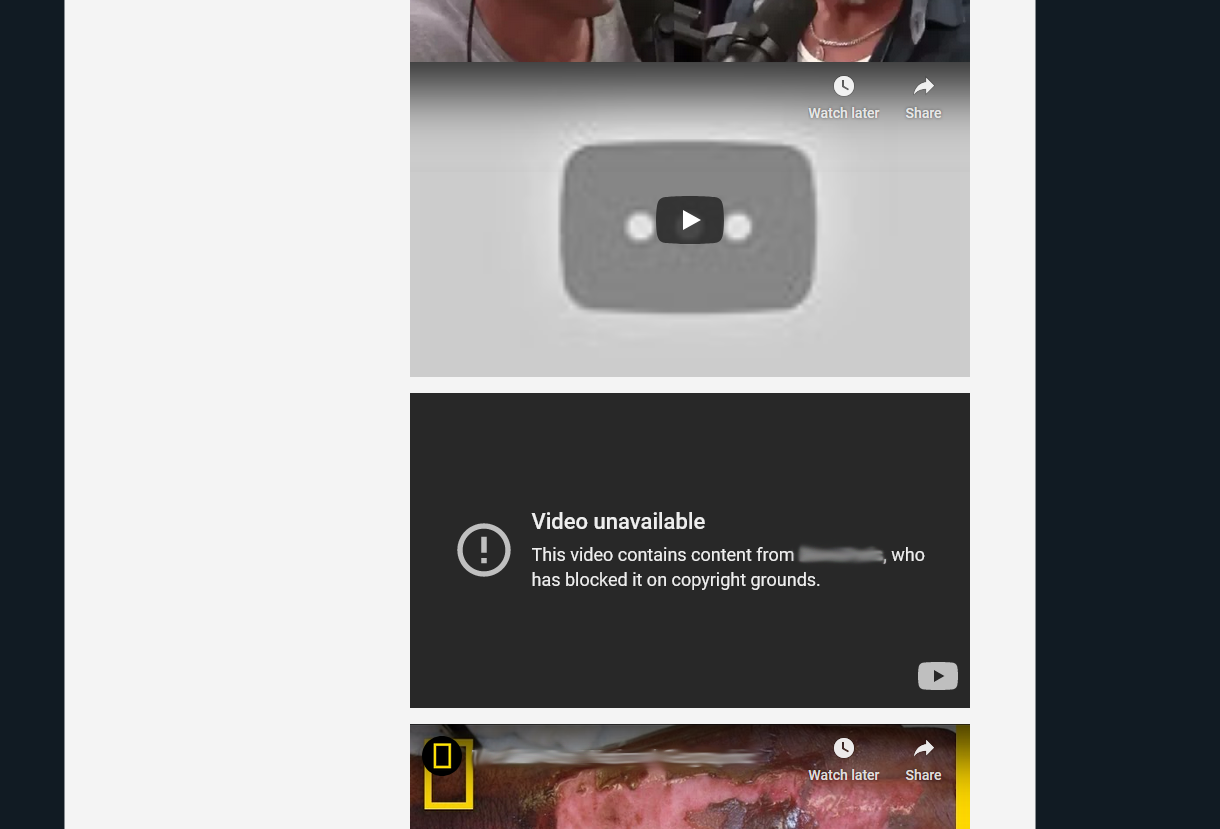
Many businesses have a dedicated “Videos” tab on their site for relevant content. Often, someone will curate video content from other sources and believe this is a valuable practice. But just as often it is fraught with problems. The image above is taken from a company website that has many videos embedded from YouTube under their “Videos” tab.

Can you see what’s wrong?

Somewhere along the way, the original content creator has removed the video, leaving blank spots with no content on the page.
Here’s why it’s not a good idea to use other folks’ videos:

    1. You have no control over their content. And if their videos are monetized on YouTube, they could be showing an ad that is counter-productive to your business.
    2. The videos may have a call to action or a link that takes visitors away from your website.
    3. The practice really does nothing to help your Search Engine Optimization and get you found more often.
    4. The best course of optimizing with videos is to have relevant content on all of your pages, especially on your About Us page. Videos under a dedicated tab may be overlooked by your visitors.
    5. Google loves original content. That means videos specific to your business and your message with a few lines of text that compel the viewer to click and watch.

Business websites that use a “Videos” tab are often not updated frequently, so problems like the image above are missed for a long period of time.
Original, professionally produced video content is affordable and gives your business an advantage over the competition. Remember – if you use video, and they don’t: You Win!
–That’s a wrap.

Ron Harper is the founder of Videos On Your Website, a Cincinnati digital marketing firm specializing in video web content for businesses. Get a FREE Video Buying Guide at Videos ON Your Website – Cincinnati and Dayton Video Production Guide.

Customer Testimonials Become Yes-timonials With Video

Many websites have testimonials. If someone is in the service industry, or one of the trades, it’s simple to take a couple of lines off of a comment card and post it. Many of those choose only to identify the customer by first name and last initial. Then the question becomes: Is that testimonial compelling enough to close a sale? I can tell you from experience it is not.

Your customers have a story to tell about their relationship with you. That story should not only show the connection, but it should have emotion and together, those factors can help prospects form a deeper connection with your brand. You can turn those ordinary customer testimonials into YES-timonials with a well-produced video. Each video must have three things: 1. Credibility, 2. Relatability, 3. Full Disclosure.

The word Incredible actually means Not Credible. I’ve written before about the service where you can get actors to rave about your product or service on video. Their acting is over-the-top, and they’re too polished. How can that be at all credible? Trust and believability is established within a few seconds of listening to someone. If they are credible, you’ll want to keep listening.

The customer must be relatable. They should be in the same demographic as the target customer, and they must look and talk the same as well. There is one testimonial I see a lot with a couple of women from Wisconsin raving about a certain website. Their stats show that they do very well in the Midwest, but their customer base is almost non-existent in Tennessee, Georgia, Arkansas and Texas.

There must be full disclosure. Did you know that many products give out samples to professional reviewers? They must report it if that is the case. Some do not. Full disclosure also extends to the customer’s name. They can’t be listed as “Bill R.” And that also means they must sign a waiver and agree to have their name listed under their testimonial

I recently produced a series of video YES-timonials for someone who advises folks on retirement goals. We had one from a CPA who described how he went from a skeptic to a raving fan. We produced another one targeted at Millennials. The messages are compelling and make you want to find out more.

Videos are six times more likely to be shared than a photo. And Forbes says 64% of customers are more likely to buy a product online after watching a video about it.
If you’d like to learn more about making video YES-timonials, ask for my e-book and learn the good, the bad, and the awkward of having to do it yourself.

–that’s a wrap.

Videos Less Than $100

Sell The Problem You Solve
80 percent of Americans search online when they are ready to buy products or services. That’s eight out of 10. Or in other words, fill Paul Brown Stadium to capacity except for the end zone seats.

When those potential customers land on your website, they evaluate you based on how quickly they can find solutions to their “pains”.

Want to convince those folks to buy from YOU? Use video to answer their questions and address their pains.

  • The average internet user spends 88% more time on a site with video
  • Including video on a landing page can increase conversion by 80%.
  • 90% of users say that seeing a video about a product is helpful in the decision process
  • After watching a video, 64% of users are more likely to buy a product online

Videos On Your Website can now offer professionally produced, bite-sized videos to answer your customers’ specific questions.
Packages of 5 or 10 short videos -shot at your location- for less than $100 per video.
We write, shoot, edit, add post-production, and show you where to put your videos.
Contact us for full details

–that’s a wrap

7 Mind Blowing Things You Can Do With Video

First off, you and I both know there are way more than just 7 in this list. For example, it’s mind blowing to me that videos can touch someone so personally that they get choked up. There is one piece particularly that no matter how many times I see it, I need a tissue at the end. It blows my mind that almost 30 hours of video is uploaded to YouTube every MINUTE!

So let’s get to the list. And be sure to tell me what you think.

1. VIDEO CAN OFFER COUPONS.
It costs a few hundred dollars a month to get coupons included in that blue envelope that gets delivered in the mail. You can do it for free with video AND change them anytime you like. With YouTube annotations, you can control where the coupon code is placed in the video. Remove or change the annotations whenever you want.

2. VIDEO CAN MAKE AUDIENCE SPECIFIC MESSAGES.
I did this in radio all the time, and now it is possible in video. Create a custom open and close – also called a wraparound – and address a specific audience, need, or event. This works great when you have multiple targets, or multiple locations. The body of the message stays the same, but each one has a unique feel to it.

3. VIDEO CAN PUT YOURSELF IN ANY LOCATION.
Want to be in a beautiful, modern studio or in front of the Eiffel Tower or even miniaturize yourself to show someone the inside details of your thingamabob? Do it with a green screen. The same technique that the TV weatherman uses to stand in front of the map can put you almost anywhere.

4. VIDEO CAN DEVELOP YOUR OWN REALITY / DIY / COMEDY SERIES
Ten years ago if you wanted to get your message in front of a mass of people, you had to have a major publisher or network behind you. All that has changed. The gates are wide open for anyone to produce whatever content they wish. YouTube has spawned its share of stars: folks who are actually making a living writing and producing these little videos. You can too. What would you do with your own network?

5. VIDEO CAN KNOW HOW MANY FOLKS ARE WATCHING.
What can newspapers, radio, television and even direct mail never do that online does very well everyday? Tell you who’s watching. Print and electronic media know how many people they reach, but not the engagement. And when someone clicks to start a video, they are choosing to consume that content. Many analytics can tell you the communities those folks are from.

6. VIDEO CAN MAKE SMALL BUSINESSES LOOK LIKE THE BIG GUYS.
It’s not a budget statement anymore. With the right video, your only limit is your imagination. Remember the Coke and Pepsi challenge?
You can pit yourself against your competition all day and show how you’re better, safer, cleaner, greener. Tell your story to the folks you want to reach. Make them care and they will share.

Any one of these techniques has the power to blow your mind when applied properly. And if you’re not using video at all, your competitors will.

–that’s a wrap.

How To Make You Tube Work For You

Many businesses who use videos don’t have the time or the tools to host their videos on their own server, so they opt for loading their productions on You Tube and using the embed code. If you really don’t have any other options, it’s still better to have something on You Tube than nothing at all. So here’s a list of tips and tricks. The more of them you can accomplish, the better off you will be in placing your content where the search engines will find and display it.

GIVE YOUR VIDEO A GOOD TITLE. Use keywords. Make it compelling. No one will watch, nor will they search for “October video.mp4” But they will watch “How I Saved Money and Solved My ——- Problem In Three Steps.” Get the picture?

PAY ATTENTION TO THE DESCRIPTION FIELD. The very first thing should be http:// and your website. Not just your homepage, but a page that gets the viewer closer to doing business with you.

UPLOAD A TRANSCRIPT / CREATE CAPTIONS This is a relatively new feature, but it is possible now to upload a transcript of your video to You Tube. There is also a feature that will let you create captions so the video can be watched, instead of heard. There is an entire list of best practices for these actions themselves, so ask for help, or search for tutorials. Big hint: don’t use WORD to create your files. Use WORDPAD so you can save them as .txt files without all the format encoding. Or, if you understand video time code, create a .srt file and you’re able to more precisely control your captions. The ability for the search engines to read videos due to transcripts is really a game changer.

CREATE A NEW PAGE FOR JUST THE VIDEO If you can whip up a single page on your site, and embed the video, surrounded by keywords and phrases that would be great. Then you can put THAT URL into the You Tube description field. If you have one video optimized for a key phrase, and a different video optimized for a different key phrase, you have increased your chances of being on top of a search and having that search lead back to you.

TELL EVERYONE. Put the You Tube Share code on every social network you can. Your promotion needs to run like a good ad campaign. Maybe not everywhere all at once, and maybe some places more than once. But get it out there and create some talk. Ask folks to share. Ask for comments. Ask for subscribers.

BRANDING. FYI, as part of it’s newly launched “In Video Programming”, you can upload an image that You Tube will use as a “bug” in the corner of your videos. You can also pick which corner of the video it appears in, and for how long. There is also a seldom used workaround for the You Tube embed code that removes You Tube branding.

Some folks don’t want to be associated with You Tube because of its “pedestrian” image. But You Tube is the second largest search engine. It’s a great place to put your videos. And by following some simple steps, it can be another tool in your arsenal for getting noticed.
–That’s a wrap.

3 Vital Marketing Questions Every Business Must Answer

I don’t care if you’re a solopreneur or own a company with 50 employees – you know how to get or create inventory, what your profit margin is, and who your target market is. Now, let’s see how you answer these three vital marketing questions. I’ll have answers at the end.
1. WHY DO YOU HAVE A WEBSITE? What is its purpose? Is it an online brochure? Do you actually sell product and collect revenue there? Is it because everyone else has one?
2. ARE THE RIGHT PEOPLE VISITING YOUR SITE? Do you know who they are and how they found you? Do you know what phrase they put into a search engine that brought your site into the results? How long are they staying ?
3. WHAT DO YOU WANT THEM TO DO? Place an order? Subscribe to your newsletter? Call you to find out more? If you don’t ask your visitors to do something, then they won’t.
NOW LET’S SEE THE ANSWERS
1. If someone recommends you to a friend, 8 out of 10 of those folks will head to the web to check you out. If you can’t answer their questions, they’ll go elsewhere very quickly. Videos immediately establish trust and expertise.
2. You can target the right visitors all across the web with videos. Use blogs, social media, local search and more. When they do find you, make them stay with compelling videos that answer their questions and show off your product or service.
3. Whether you want visitors to fill out a form, subscribe to a newsletter or buy a product, 70% more visitors convert after watching a video.
Want to talk about more ideas? Call me. Because if you aren’t using video and your competition is, you lose.
–that’s a wrap.